
The Definitive Guide to Deploying Qwen3 on the NPU of the Orange Pi 5 Pro/Max/Plus/Ultra Using RKLLama and MicroK8s

May 6, 2026
Goals of this guide
Project Objectives
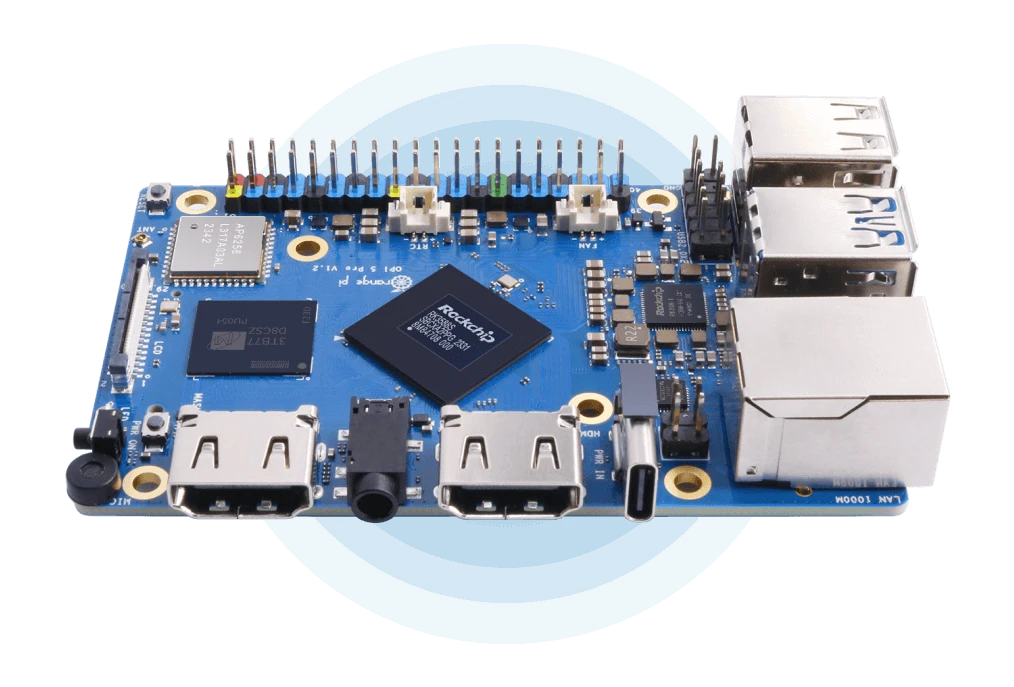
This guide provides a comprehensive walkthrough for running Local Large Language Models (LLMs) on the NPU (Neural Processing Unit) of the Orange Pi 5 series (Rockchip RK3588(S) SoC). The process covers everything from model conversion on an x86/64 PC to final deployment on the SBC as an API service using RKLLama orchestrated via Kubernetes (MicroK8s).
The guide is divided into three main phases:
- Model Conversion: Converting a Hugging Face LLM (e.g., Qwen3-8B) to the
.rkllmformat optimized for the NPU, utilizing W8A8 or W4A16 quantization. - Native Inference: Executing the model directly on the Orange Pi using the Rockchip SDK
llm_demobinary for validation. - Service Deployment: Deploying an RKLLama server within a Kubernetes Deployment, exposing a REST API compatible with Ollama and OpenAI.
Key Benefits
- Total Privacy: Data never leaves your infrastructure. You eliminate reliance on third-party APIs (OpenAI, Anthropic, etc.) for sensitive LLM tasks.
- Zero Inference Cost: Once the hardware is acquired (~$100-200), there are no recurring costs for tokens or cloud subscriptions.
- Low Latency: Running on a local network eliminates the round-trip latency associated with external cloud servers.
- Hardware Optimization: The RK3588(S) NPU (6 TOPS) is often underutilized; this guide provides a high-performance use case for the chip.
- Standardized API: RKLLama exposes endpoints compatible with Ollama (
/api/chat,/api/generate) and OpenAI (/v1/chat/completions), enabling seamless integration with Open WebUI, LangChain, Continue.dev, and other existing clients. - Resilience: By utilizing Kubernetes, the service benefits from self-healing (automatic restarts), easy updates, and scalable management.
Problem/Solution Overview
| Problem | How this guide solves it |
|---|---|
| Reliance on paid external APIs | 100% local NPU execution with zero per-token costs |
| Privacy concerns with third-party data handling | Localized processing; data remains within your private network |
| Complex/Error-prone model conversion | Verified steps with solutions for common pitfalls (Git LFS, CUDA, quantization) |
| Manual server management | Kubernetes Deployment with health checks, auto-restarts, and persistent storage |
| Incompatibility with LLM ecosystem tools | RKLLama implements Ollama/OpenAI APIs for "plug-and-play" compatibility |
| Maintenance and update overhead | Simple kubectl commands for rollouts, updates, and environment cleanup |
Glossary of Key Concepts
LLM (Large Language Model)
Models trained on massive text datasets (e.g., GPT-4, Llama 3, Qwen3). In their native format, they require significant VRAM/RAM. This guide adapts them for edge hardware.
Inference
The process of using a pre-trained model to generate responses from a prompt. Unlike training, inference is computationally "lighter" but requires specialized hardware for real-time performance on SBCs.
NPU (Neural Processing Unit)
A specialized processor designed for the matrix multiplications and convolutions required by neural networks. The RK3588(S) features a 6 TOPS NPU, significantly more efficient for AI tasks than a standard CPU.
TOPS (Tera Operations Per Second)
A measure of AI compute capacity (trillions of operations per second).
| Processor | TOPS | Typical Use Case |
|---|---|---|
| RK3588(S) NPU | 6 | SBCs, Edge AI |
| Apple M2 Neural Engine | 15.8 | Laptops |
| NVIDIA Jetson Orin Nano | 40 | Robotics, Edge Computing |
| NVIDIA RTX 4090 (INT8) | ~660 | Data Centers / Desktop |
Quantization
A technique to reduce model size and compute requirements by converting weights from high-precision floating point (FP32/FP16) to lower-precision formats (INT8, INT4).
Supported RKLLM Quantization Types
| Type | Meaning | Weights | Activations | Approx. Size | Quality | Recommended Use |
|---|---|---|---|---|---|---|
| W8A8 | Weight 8-bit, Activation 8-bit | INT8 | INT8 | ~1× original INT8 | High | Recommended for ≥12GB RAM |
| W4A16 | Weight 4-bit, Activation 16-bit | INT4 | FP16 | ~50% of W8A8 | Moderate | Use for limited RAM or larger models |
Practical Example: A Qwen3-8B model (~16GB in FP16) reduces to ~8.3GB with W8A8 and ~4.5GB with W4A16.
RKLLM Format
A proprietary Rockchip binary format containing the quantized model optimized for the RK3588/RK3576 NPU. Created using the rkllm-toolkit.
Tokens
The basic units of text processed by an LLM. As a rule of thumb, 1 token ≈ 0.75 words.
Prerequisites
- x86/64 PC running Linux (Debian/Ubuntu recommended).
- Python 3.8 or 3.10/3.11 (Conda is highly recommended).
- Orange Pi 5 Pro/Plus/Max/Ultra: Ubuntu 24.04 with RKNPU driver 0.9.6+.
- Verify with:
sudo cat /sys/kernel/debug/rknpu/version
- Verify with:
- M.2 SSD: Highly recommended for model storage.
- Active Cooling: Essential to prevent thermal throttling.
Part 1 — x86/64 PC: Model Conversion
1.1. Environment Setup
1.1.1. Clone the Rockchip SDK:
git clone https://github.com/airockchip/rknn-llm.git
cd rknn-llm
1.1.2. Create Conda environment and install toolkit:
conda create -n rkllm-converter python=3.11 -y
conda activate rkllm-converter
pip install rkllm-toolkit/packages/rkllm_toolkit-1.2.3-cp311-cp311-linux_x86_64.whl
1.2. Download Model from Hugging Face
1.2.1. Install required tools:
pip install huggingface_hub
1.2.2. Download via CLI:
huggingface-cli download Qwen/Qwen3-8B --local-dir ~/Qwen3-8B
⚠ CRITICAL: Avoid standard
git cloneunless you manually rungit lfs pull. Otherwise, you will only download 135-byte "pointer" files, resulting inMetadataIncompleteBuffererrors.
1.3. Quantization Data
Create a data_quant.json for the calibration process:
cat > ~/rknn-llm/examples/rkllm_api_demo/export/data_quant.json << 'EOF'
[{"input": "Human: Hello!\nAssistant: ", "target": "Hello! I am the Qwen3 AI assistant!"}]
EOF
1.4. Configure and Run the Export Script
1.4.1. Edit the script (~/rknn-llm/examples/rkllm_api_demo/export/export_rkllm.py):
from rkllm.api import RKLLM
import os

modelpath = '/home/user/Qwen3-8B'
llm = RKLLM()

# Load model (use device='cpu' if no NVIDIA GPU is present)
ret = llm.load_huggingface(model=modelpath, device='cpu', dtype="float32")
if ret != 0: exit(ret)

# Build quantized model
ret = llm.build(do_quantization=True,
                quantized_dtype="W8A8",
                quantized_algorithm="normal",
                target_platform="RK3588",
                num_npu_core=3,
                dataset="/home/user/rknn-llm/examples/rkllm_api_demo/export/data_quant.json")
if ret != 0: exit(ret)

llm.export_rkllm(f"./Qwen3-8B_W8A8_RK3588.rkllm")
1.5. Cross-Compile the Demo Binary
sudo apt install cmake
wget https://developer.arm.com/-/media/Files/downloads/gnu-a/10.2-2020.11/binrel/gcc-arm-10.2-2020.11-x86_64-aarch64-none-linux-gnu.tar.xz
# Build using build-linux.sh after setting GCC_COMPILER_PATH
Part 2 — Native Inference on Orange Pi 5
- Transfer files to the Orange Pi:
llm_demo,librkllmrt.so, and the.rkllmmodel. - Set environment and limits:
export LD_LIBRARY_PATH=$LD_LIBRARY_PATH:$(pwd) ulimit -HSn 102400 - Run Inference:
./llm_demo ./Qwen3-8B_W8A8_RK3588.rkllm 256 320
Part 3 — Kubernetes Deployment (MicroK8s)
3.1. Setup on Orange Pi
- Install MicroK8s:
sudo snap install microk8s --classic microk8s enable dns storage - Prepare Model Directory:
Place your
.rkllmfile and aModelfilein~/rkllama-models/Qwen3-8B/.
3.2. Kubernetes Manifest (rkllama-k8s.yaml)
---
apiVersion: apps/v1
kind: Deployment
metadata:
  name: rkllama
  namespace: rkllama
spec:
  replicas: 1
  template:
    spec:
      containers:
      - name: rkllama
        image: ghcr.io/notpunchnox/rkllama:main
        securityContext:
          privileged: true # Required for NPU access
        env:
        - name: RKLLAMA_PLATFORM_PROCESSOR
          value: "rk3588"
        volumeMounts:
        - name: models
          mountPath: /opt/rkllama/models
        - name: dev-npu
          mountPath: /dev
      volumes:
      - name: models
        persistentVolumeClaim:
          claimName: rkllama-models-pvc
      - name: dev-npu
        hostPath:
          path: /dev
3.3. Apply and Test
microk8s kubectl apply -f ~/rkllama-k8s.yaml

# Test API
curl -X POST http://localhost:30080/api/chat \
  -H "Content-Type: application/json" \
  -d '{
    "model": "Qwen3-8B",
    "messages": [{"role": "user", "content": "Hello!"}],
    "stream": false
  }'
Troubleshooting
| Error | Cause | Solution |
|---|---|---|
expected value at line 1... |
tokenizer.json is a Git LFS pointer |
Use huggingface-cli download |
CrashLoopBackOff |
Missing NPU access | Check privileged: true and /dev/rknpu* mounting |
Connection refused |
Server initializing | Wait for readiness probe or check logs |
Our latest news
Interested in learning more about how we are constantly adapting to the new digital frontier?

Insight
July 27, 2026
Nebrija Education Group scales its student services with Jira Service Management: a unified, data-driven experience for more than 15,000 students
Tech Insight
July 1, 2026
The New Era of Agentic Programming: Antigravity 2.0 and Sngular Gen

Tech Insight
June 16, 2026
Generative UI: When AI Architecture Builds the Interface, Not Just the Text

Corporate news
April 21, 2026
We have integrated AMS Solutions to strengthen our capabilities in managed services and AI-assisted software development