
How to automate your meetings with Atlassian Loom: templates, triggers, and smart values

January 26, 2026
One of the biggest advantages of working on a platform as versatile as Atlassian is that it allows us to interact with all products in the same environment, taking advantage of their best capabilities.
In today's article, we talk about how to combine the power of Loom when recording videos, meetings, demos, explanations to the team... with the power of automation, so that the magic happens without us even noticing.
At the end of 2025, the full integration between Loom and Automation was finally unveiled. Want to know exactly what that means?
These are the features that are available today:
Templates
Automation templates are always the easiest way to get started, and also the fastest.
There are currently three different templates designed for the following use cases:
-
Summary of the recorded meeting and sending of information via Slack.
-
Creation of automatic tasks after recording the meeting.
-
Creation of a page in Confluence with the meeting summary.

Triggers
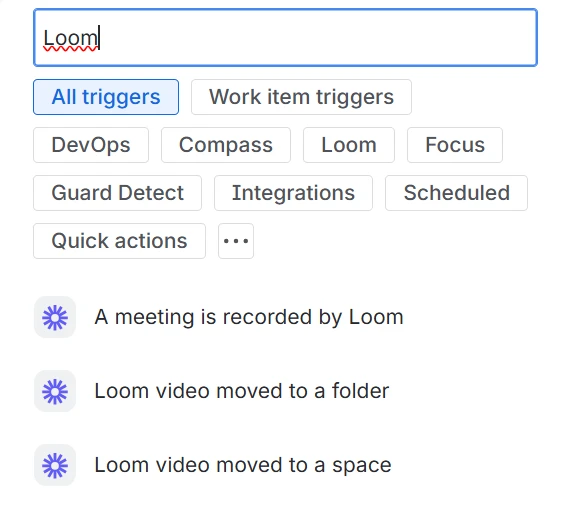
If you prefer to build the rule from scratch, there are also several options when adding a new trigger:
-
A new meeting recording.
-
A new Loom video moved to a folder.
-
A new Loom video moved to a space.
Smart values
Smart values are dynamic variables that allow you to make Automation rules more flexible and add even more power and complexity to them. Here is a cheat sheet that you can use whenever you need it:
-
{{loomVideo}}
-
{{loomVideo.url}}
-
{{loomVideo.isMeeting}}
-
{{loomVideo.actionItems}}
-
{{loomVideo.title}}
-
{{loomVideo.transcript}}
-
{{loomVideo.creator}}
-
{{loomVideo.creator.emailAddress}}
-
{{loomVideo.creator.accountId}}
-
{{loomVideo.creator.fullName}}
-
-
{{loomVideo.dateCreated}}
-
{{loomVideo.attendees}}
-
{{loomVideo.summary}}
-
Some examples
In case you're short on ideas, here are a few that you can get started on right away:
Client meetings
If you hold regular meetings with clients, remember to record them with Loom. Once finished, the session notes will be saved on the corresponding Confluence page, and from there you can ask Rovo to generate the corresponding tasks, notify the people involved, and follow up periodically so that nothing slips through the cracks.
Follow-up meetings
After your one-to-one meetings with your team, Loom can send the notes to the relevant person and align positions. To their email, or directly to the Slack channel you have open together.
Brainstorming
Brainstorming sessions tend to be a bit chaotic. If you record them with Loom, you can then ask it to generate a Whiteboard in Confluence with all the ideas discussed, or directly add ideas to your Jira Product Discovery space. If you're left alone with the brainstorming session, it will be much more difficult to execute them.
QA & product demos
Turn QA sessions and product demos into structured documentation that can be used for the product itself. That way, you won't waste time repeating the same message over and over again; you'll only have to record it once.
And there are a thousand more examples that you could already be putting into practice if you activate Loom in your environment.
If you want to learn more about all the features available with Loom, you can take a look at these available resources in Atlassian Learning.
If you have any questions or are unsure how to integrate this option into your environment, then let us know and we'll find the best way to help you out.
Our latest news
Interested in learning more about how we are constantly adapting to the new digital frontier?
Insight
April 27, 2026
Remix with Rovo in Confluence: Transform Your Data into Visuals

Insight
April 13, 2026
What's New in Atlassian Goals: A Clearer View of Owners, Followers, and Labels
Insight
March 29, 2026
Jira Service Management Surveys: How to Create Advanced Satisfaction Surveys in Atlassian

Tech Insight
February 16, 2026
Atlassian Assets, now as a platform app