Ray Tracing, a quick look at what it is and the math behind it

February 26, 2026
I am sure a lot of you have heard about Ray Tracing, and how this technology has revolutionized the world of cinema and video games. But, what is Ray Tracing? And how does it work?
In this article, we are going to explore the basic math of how Ray Tracing works. Do not worry, nothing is going to be too technical or too mathematical, but after reading this, you will have a better understanding of what is going on.
So, what is Ray Tracing?
Let’s first talk about how we see. Please forgive my drawing.
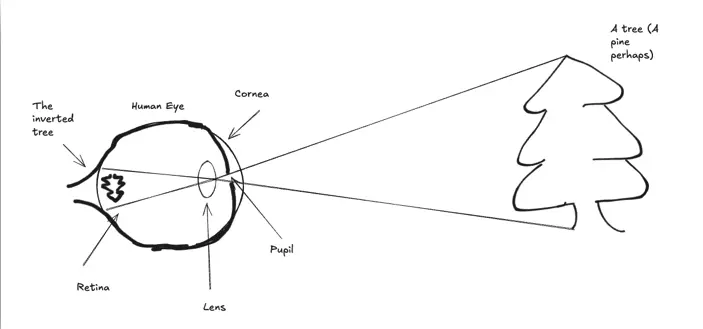
Figure 1
Everything starts with light. The light comes and passes through the cornea, and some of it enters through the pupil. Then, those lenses that you see there focus the light on the retina. The light hits the retina, which has some photoreceptor cells in which the brush strokes of the images are “drawn” in the way of electric signals that later on the brain uses to turn that into an image. This is far from an exact medical or biological explanation, but it will help for our purposes.
A ray of light comes projected from the environment to the eye, and then the eye does its magic and those rays hit the retina to map the image.
So, what if we could build an eye that, instead of catching those rays, casts those rays to the environment?
Let’s use our imagination. Let’s imagine this “retina” (the one that has those photoreceptor cells in which the ray of light hits) as an N x N grid (a 2D grid). And let’s imagine that in these grid cells, instead of catching rays, they cast rays to the environment.
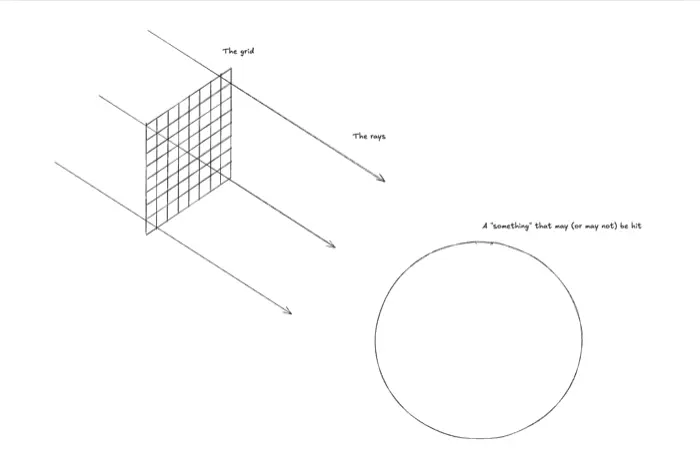
Figure 2
So now our imaginary retina, our grid, is casting rays. Each cell casts a ray. Each ray is in search of something, it’s trying to hit something. If it hits, then the cell knows that something is there and it can paint a brushstroke on itself. If the ray does not hit anything, then the cell remains empty. From now on, let’s call these cells: “pixels”.
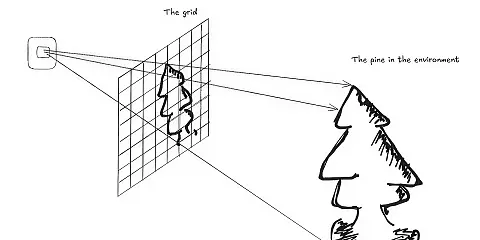
So, adding a point of view, these rays are cast from the pixels and little by little, the pixels that register a hit start drawing the image.
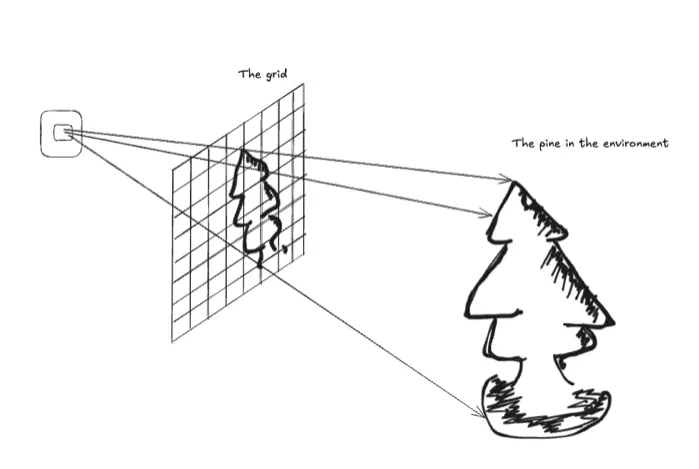
Figure 3
With this, we get the idea of what Ray Tracing is, right? It is a technique to create images (and it can create reflections, refractions, shadows, and more) by casting and tracing rays through pixels (the 2D grid) into a 3D environment.
Let’s get into a little of the math.
So, how does a cell (pixel) know if its ray has hit something? To explain this, I will use a quick 2D example. Why 2D? Because doing operations with 2 dimensions is easier than with 3 dimensions, and that way I can show you the example better. However, the formulas apply the same to 2D or 3D.
Let’s start by introducing one concept: Some shapes have simple functions so you can plot them on a Cartesian plane, and the function of a circle at the center of a Cartesian plane is:
x² + y² = r²;
Where r is the radius.
Maybe it is easier if we just solve the equation for y.
Then:
y = ±√(r² - x²);
You may wonder why that weird plus-minus sign is there. Remember that the square root of something can be positive and negative. For example, the square root of 4 can be either -2 or 2.
So, if you define a radius, say 1, and you try different x values, you will see how a circle will start appearing in your Cartesian plane. If you want to try, go ahead and open Desmos (https://www.desmos.com/calculator), which is a great online graphing calculator.
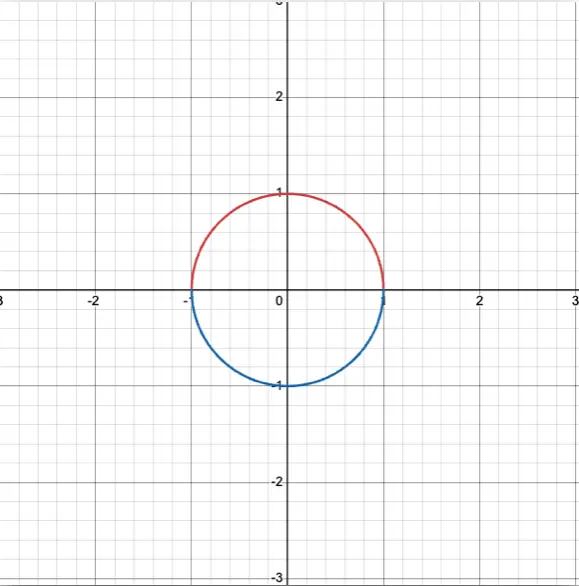
Figure 4
Diving into the ray equation
Now, let's introduce another concept: the ray equation. Do not worry, it is really simple.
The ray equation is:
R(t) = O + tD;
Where R is the ray, O is the origin, and D is the direction. Just remember the explanation we started with: In Ray Tracing, the eye casts a ray. This ray has an origin and a direction. Review Fig 3 again, showing how we have some arrows going from the eye to the plane.
So, only one thing is missing: what is t? We can say t represents the point at which the ray collided with the figure.
So, let’s go slow:
Say we have the same circle that I show you above, where the radius is equal to 1. Say I have the eye at the point (1, 1), going in the direction of (-1, -1) (the bottom-left quadrant). How can I know if the ray will hit my circle?
Pretty simple. Remember what t is: t represents the point at which the ray collided with the figure. If t is negative or not a real number, then it never collides. So, I just need to solve the equation of the ray for t. Let’s do it together.
First, let's prepare the circle equation. I will do everything step by step so we do not get lost.
Remember that the equation is:
x² + y² = r²;
If radius is 1, then
x² + y² = 1;
Step 1: Preparing the ray equation
Now, let's prepare the ray equation. You may wonder, if the origin is (1, 1) and the direction is (-1, -1), how can we plug that into the equation? Well, you will need the following:
Rₓ(t) = Oₓ + tDₓ;
Rᵧ(t) = Oᵧ + tDᵧ;
Yes, one for X and one for Y, which translates to:
Rₓ(t) = 1 + t(-1) = 1 - t;
Rᵧ(t) = 1 + t(-1) = 1 - t;
Now, we can plug these equations into the circle equation.
(1 - t)² + (1 - t)² = 1;
Why are we doing this? Basically, what we want to know is what t values produce the x and y values that cause the ray to hit the circle. In other words, what t values produce an x and a y that are actually part of the circle. Look at Fig 5. We want to find a value of t that produces one of the points that form the circumference of the circle.
Step 2: Discovering the "t"
Now, we only need to solve for t.
(1 - t)² + (1 - t)² = 1;
Then:
2(1 - t)² = 1;
Then:
(1 - t)² = 1/2;
Then:
(1 - t) = ±√(1/2);
Remember that when solving square roots, we include the plus-minus sign:
(1 - t) = ±√(1/2);
So finally:
t = 1 ± √(1/2);
Which means that:
t = 1 + 0.7071 and t = 1 - 0.7071.
So:
t = 0.2929 and t = 1.7071.
Step 3: Finally solving the ray equation
We have two results. This means that the ray hits the circle twice. Remember that if t is negative or not a real number, it means that the ray never hits the circle.
But we got t. That means the ray did hit the circle. Usually in Ray Tracing for this case, you take the smaller value of t, as that means the ray hit that object first and the second hit is obstructed by the first one, so it is technically not visible (the second hit object is behind the first hit object). But this time, we will solve for both.
Remember the ray equations:
Rₓ(t) = Oₓ + tDₓ;
Rᵧ(t) = Oᵧ + tDᵧ;
Where O = (1, 1) and D = (-1, -1).
Doing this for t = 0.2929:
Rₓ(t) = 1 + (0.292803)(-1) = 0.7071;
Rᵧ(t) = 1 + (0.292803)(-1) = 0.7071;
Meaning that the first hit is at (0.7071, 0.7071).
And doing the same for t = 1.7071:
Rₓ(t) = 1 + (1.7071)(-1) = -0.7071;
Rᵧ(t) = 1 + (1.7071)(-1) = -0.7071;
Meaning that the second hit is at (-0.7071, -0.7071).
Let’s go ahead an see this in Desmos:
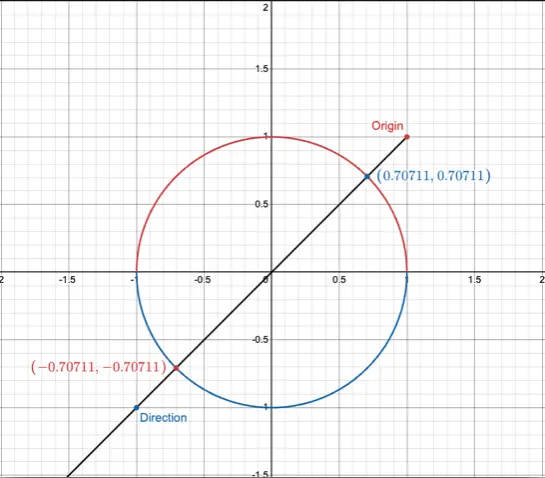
Figura 6
So, we were right! We were able to calculate if a ray hit a surface, and where it hit, using only math!
To sum up
I hope that after reading this, you know a little bit more about what Ray Tracing is. As explained in the first part of this post, this technique is widely used in graphics. The technique consists basically of casting these rays out of a grid box and seeing if they intersect with something. If they do, then you draw in that pixel box of the grid.
Also, I hope you now know a little bit of the math behind it. Of course, there is a lot more to this, like optimization techniques and shadowing, but for now, this is enough so you understand the basics of it.
Our latest news
Interested in learning more about how we are constantly adapting to the new digital frontier?

Tech Insight
June 16, 2026
Generative UI: When AI Architecture Builds the Interface, Not Just the Text

Insight
February 5, 2026
Infinite Worlds: When the best graphic is your imagination

Event
May 26, 2025
Madrid pulses with the new era of Artificial Intelligence at the Google Cloud Summit 2025

Tech Insight
April 29, 2025
Banco Sabadell supercharges its Galatea design system, with cutting-edge optimization and a groundbreaking validation tool